Orders, KDS, live feed
Tickets fly from the front-of-house tablet to the Kitchen Display the moment they're sent. Cooks see prep time, station, modifiers and tap READY when the dish leaves the pass. Servers know the second it happens.
From the host stand to the kitchen pass, dine-in, takeaway, delivery, QR menu and self-order kiosk all fire into the same ticket queue. Works on any Android tablet, offline-tolerant, no per-order commission.
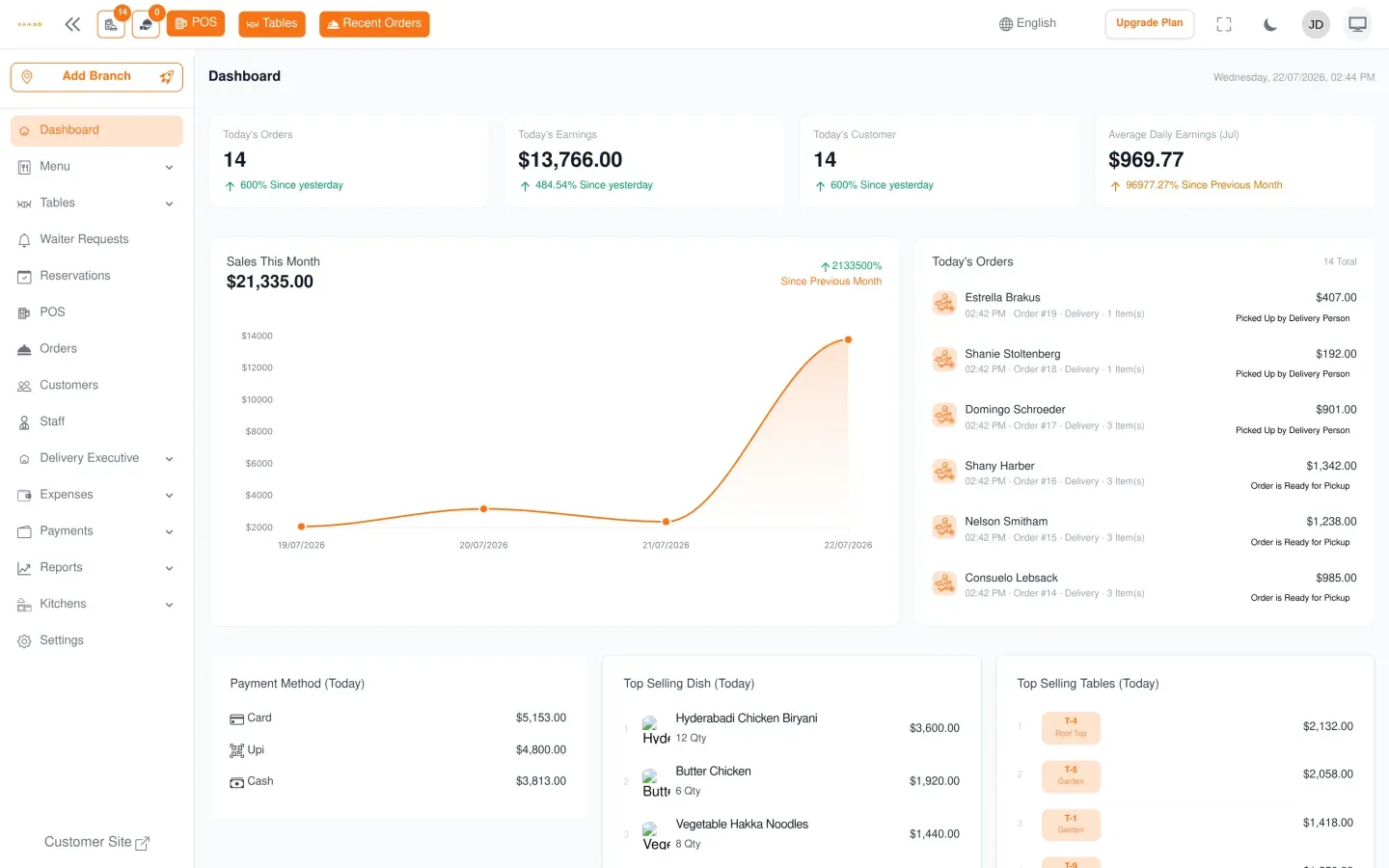
Watch a table get ordered on its own, or tap a dish yourself: the ticket fills in and the total updates for real, then send it to the kitchen and see it land on the display.
POS · KDS · Kiosk · Inventory · Tables · Delivery · Reports · Multi-branch · WhatsApp
Dine-in · Counter · Kiosk · QR menu · Online, all in one queue
You keep every dollar your kitchen earns
Cooks see the order before the printer would have warmed up
No per-seat, no per-order and no per-branch ticket cap. Menus and admin UI are translatable through the LanguagePack module, with multi-currency and per-branch time zones.
Orders, tables, menu: Yammbo POS makes each of them disappear into the background so the team focuses on the guest.
Tickets fly from the front-of-house tablet to the Kitchen Display the moment they're sent. Cooks see prep time, station, modifiers and tap READY when the dish leaves the pass. Servers know the second it happens.
Visual floor plan with merge/split, waitlist, covers and turnover times. A glance tells you which tables are open, paying or stuck: the host stand knows who's next without a clipboard.
Update the menu once and every channel (tablet, KDS, QR menu, online) sees the change in seconds. Track inventory in real time, set automatic 86's, and run multiple branches from a single login.
The tablet is the front of house, the KDS is the back of house, the kiosk is the counter and the reports dashboard is your evening read. Same login, same data, same queue.
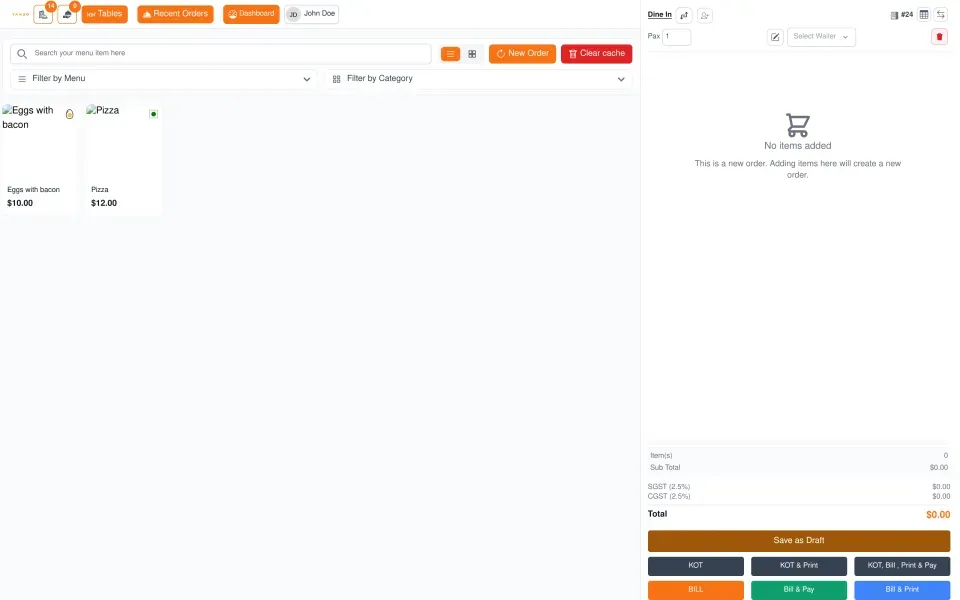
Touch ordering, splits, modifiers, void-with-reason.
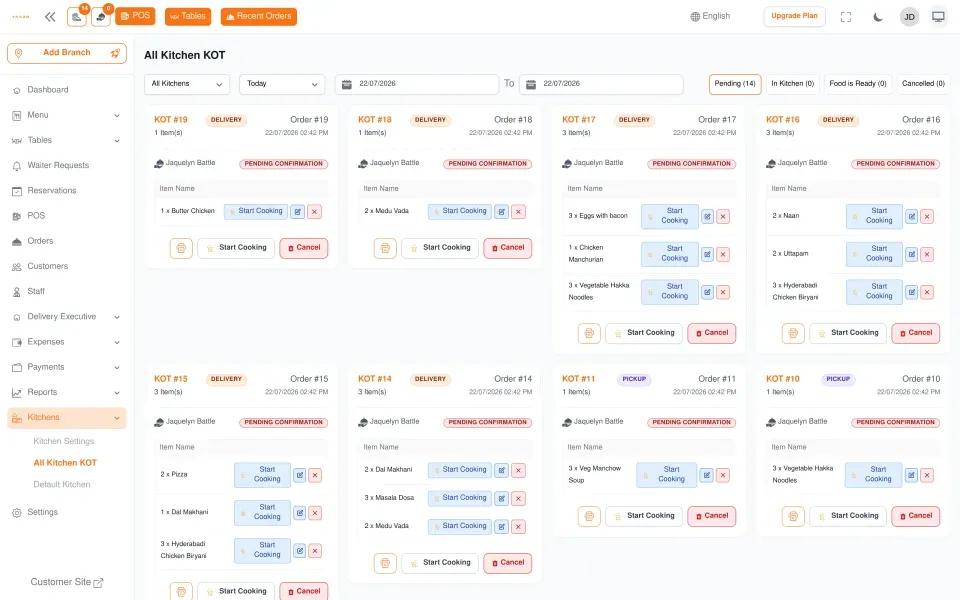
One screen per station, live KOTs, prep timers.
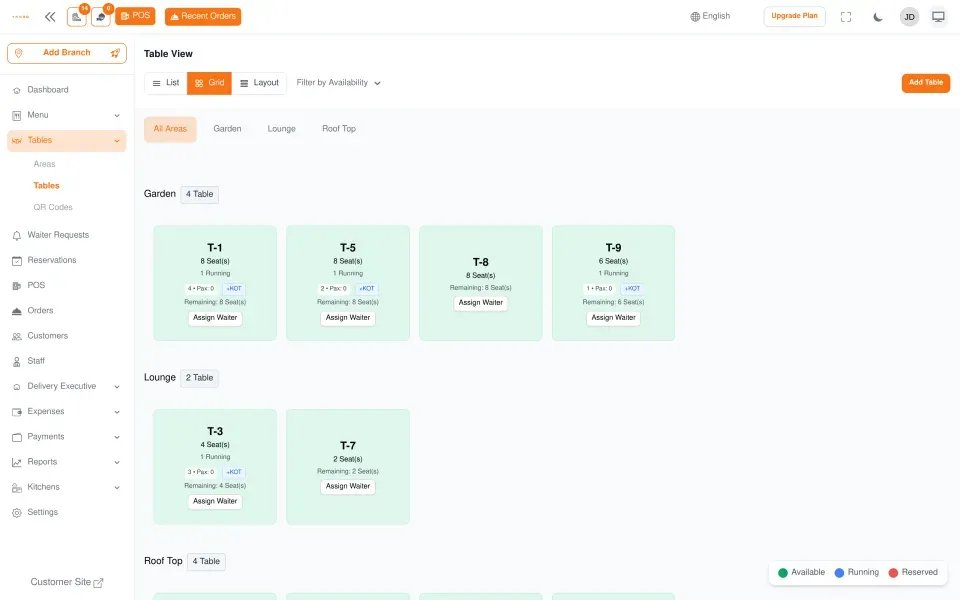
Areas, seats, running tables, waitlist, covers.
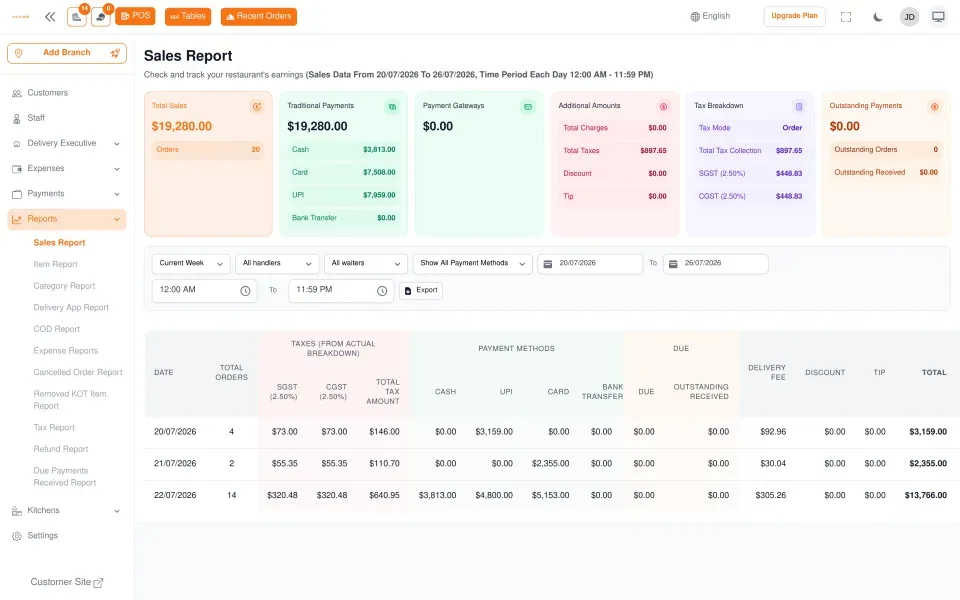
Sales, taxes, payment methods, drawer reconcile.
Free, busy, paying, dirty, reserved: a drag-and-drop floor plan with merge/split, covers count, waitlist and turnover stats. The host stand knows who's next without a clipboard, the manager sees the choke point before it choked.
Your cooks don't have to remember which app the ticket came from: the channel is a tag, the queue is one.
Waiter takes the order on the tablet, straight to the kitchen.
Same POS, ticket flagged TAKEAWAY, no plate.
Customer orders, pays, ticket fires to the kitchen.
Scan, browse, order from the table, no app install.
Public URL with your menu, your colours, your prices.
Order confirmations and the bill go out to the customer; scheduled sales and operations-summary reports go out to you.
You don't have to hand delivery to a marketplace. A dedicated portal lets your own riders sign in, pick up assigned orders and settle the cash they collect, while the kitchen keeps every order in one queue.
Delivery executives sign in with an OTP sent to their phone and see only the orders assigned to them: assigned orders, order details and delivery history.
Picked up, out for delivery, reached destination: each step updates the order, and the executive's position tracks back to the kitchen on a live map.
Executives mark what they collected in cash, then settle it; the branch sees a cash-monitoring dashboard across every executive on shift.
Admins manage delivery executives, set fee tiers per branch and choose which delivery platforms feed the queue, all from the same login.
Touch ordering, splits, modifiers
One screen per station, prep timers
No staff in the loop, card on the kiosk
Scan, browse, order from the table
Public ordering page, delivery & pickup
Executive login, live tracking, cash settlement
Confirmations, bills, sales and operations reports go out
Drag-and-drop, waitlist, covers
Stock decrements, auto-hide items
Sales, tips, voids, drawer reconcile
Many kitchens, one login
Tablets keep taking orders, sync after
Encrypted nightly, point-in-time restore
Yammbo POS runs on standard Android tablets and connects to off-the-shelf peripherals. No proprietary devices, no rented terminals, no multi-year contracts. When a tablet breaks at 19:30 you walk to the closest store, buy a new one, sign in, and you're back.
Every report, sales, tax, items, categories, refunds and more, exports to Excel on demand, and so does your menu. Your data is never locked behind a screen only we can read.
Resilience · offline-tolerant · auto backups · move-tablet in 5 min
10–14" · POS · kiosk
18–22" · Kitchen pass
ESC/POS · Receipts · kitchen
USB · Inventory · counter
USB · POS station
Standard · Charge flow
Every module shares the same data, so the host knows what the kitchen knows, and the kitchen knows what the floor is doing. Here's a normal Friday.
Manager opens the cash register, sets the float, prints the inventory delta from last night and assigns sections to the waiters who just clocked in.
Reservations arrive: the floor plan updates, the host walks guests to their table and the QR menu loads on every table without anyone touching paper.
POS tablets, KDS, kiosk and delivery drivers fire orders at the same kitchen queue. Each station sees its own tickets, prep timers turn yellow then green.
Inventory auto-decrements. A salmon dish hits the threshold, the kitchen sees the auto-86 alert and the menu hides the item from the public ordering page.
Walk-ins land on the waitlist, the host adds covers with one tap, large parties get merged tables. WhatsApp sends the customer their confirmation as each order is fired.
Z-report prints on one screen: sales, tips, voids, top items, cash drawer reconciliation. Backup runs at midnight; tomorrow opens with the same data, intact.
Real answers about running a real restaurant on Yammbo POS.
Any Android tablet works for the POS and Kitchen Display: a 10-inch tablet per waiter station and an 18-inch screen mounted in the kitchen is a common setup. We support standard ESC/POS thermal printers, USB cash drawers, USB / Bluetooth barcode scanners and most card terminals. There's no proprietary hardware lock-in.
Yes, multi-branch is built in. Each branch keeps its own menu, prices, inventory, staff and reports, but you switch between them with one click and the dashboard rolls everything up so you can compare locations side by side.
Yes. The POS tablet keeps taking orders, opening tickets and printing receipts while offline. When connectivity comes back the tickets sync automatically, the kitchen catches up and reports stay consistent. You'd typically only notice a hiccup when card processing needs the network.
A KDS screen lives in the kitchen. Each ticket appears the second it's sent from the POS, colour-coded by prep time and routed to the right station (grill, cold, pizza, bar). Cooks tap READY and the server's tablet pings: no paper, no shouting, no lost tickets.
Yes. Each table gets a QR code that opens the public menu on the customer's phone: they browse, customise modifiers and place the order straight to the same ticket queue your kitchen already watches. No app install, no marketplace commission.
Each restaurant gets its own public ordering page on a domain you choose. Orders arrive in the same tablet queue as the in-house ones, flagged as DELIVERY or PICKUP, and you can assign them to your own riders, who get their own portal with live tracking and cash-on-delivery settlement, or push them out through the REST API.
Stock decrements automatically as plates leave the kitchen. Set a threshold per ingredient or per dish; once it hits zero the menu hides the item from every channel (POS, KDS, QR, online) and the chef gets a WhatsApp ping. No more selling what you can't cook.
All three, and properly. Split a ticket by guest, by item or by amount; add modifiers (extra cheese, no onions, gluten-free) that print on the kitchen ticket; mark courses so appetisers and mains fire in the right order. Half-and-half pizzas and void-with-reason are first-class flows.
A single dashboard with sales by hour, by waiter, by station and by branch. Z-report prints with cash drawer reconciliation, tips, voids and top items. Daily, weekly and monthly exports as CSV or PDF; it feeds straight into accounting if you want.
Interface in Spanish and English, with right-to-left and additional language packs available on request. Multi-currency per branch, full tax setup per item, dispatchable receipts in the language of the guest. Time zone is configurable per branch.
Yes. Every entity (orders, menu, inventory, customers, branches) is exposed through a documented REST API with token authentication. Plug Yammbo POS into accounting, loyalty, BI or a marketplace and we'll help with the first integration if needed.
Most kitchens are up and running on the same day. Import your menu from a CSV or rebuild it in the editor, set tax rates and printer destinations, mount the KDS, train two waiters and the system runs itself by lunch. We answer onboarding questions in Spanish and English in under 12 hours.
Spin up a free account, import your menu, mount the KDS and you're ringing tickets by lunchtime. No credit card, no per-order commission, support in Spanish and English.